

CNC Routers for Beginners
Explore beginner-friendly TwoTrees CNC routers for learning engraving, woodworking, PCB machining and small prototype projects. Compare the compact TTC3018, upgraded TTC3018 Pro and larger TTC450 Pro according to working area, project size, software compatibility and room for future growth. These entry-level and hobby CNC machines provide practical starting points, but new users should still expect to learn toolpaths, workholding, cutter selection and safe machine operation.
-
Ušetříte 3.096,00 Kč
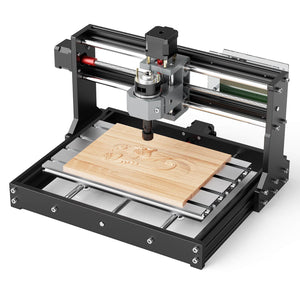

Twotrees TTC3018 CNC Router Machine
Běžná cena Od 3.516,00 KčBěžná cena6.612,00 Kč-3.096,00 Kč Výprodejová cena Od 3.516,00 Kč -
Ušetříte 2.874,00 Kč

 New
NewTwotrees TTC3018 Pro CNC Router Machine
Běžná cena Od 4.401,00 KčBěžná cena7.275,00 Kč-2.874,00 Kč Výprodejová cena Od 4.401,00 Kč -
Ušetříte 3.096,00 Kč


Twotrees TTC450 PRO CNC Router Machine(EU US Direct Ship, VAT Included)
Běžná cena Od 11.034,00 KčBěžná cena14.130,00 Kč-3.096,00 Kč Výprodejová cena Od 11.034,00 Kč


Know More
How to Choose a CNC Router for Beginners
A beginner CNC router should provide enough capability to learn design, toolpaths, workholding and machine control without forcing a first-time user into an unnecessarily large system. A compact hobby CNC machine can be used for engraving, signs, PCB projects, models, small wood parts and prototypes while teaching the same core workflow used on larger machines.
Entry level does not mean completely automatic. New users still need to learn safe setup, coordinate systems, cutter selection, feeds and speeds, and how to test a toolpath before running a finished part. This collection focuses on three current TwoTrees models that provide a practical starting point at different project sizes. For the complete machine range, visit the TwoTrees CNC router collection.
1. Compare Entry-Level TwoTrees CNC Machines
| Model | Working range | Why a beginner may choose it | Consider before buying |
|---|---|---|---|
| TTC3018 | 300 × 180 × 40 mm | Compact platform for learning engraving, PCB work and small projects | Limited work area; verify computer and software compatibility |
| TTC3018 Pro | 300 × 180 × 40 mm | Same compact project size with an upgraded metal Z-axis structure | Still intended for small workpieces and requires careful setup |
| TTC450 Pro | 460 × 460 × 80 mm | Larger workspace for signs, wood, acrylic and room to develop skills | Requires more bench space, a larger budget and stronger dust control |
Working ranges are based on the current product specifications. Always confirm the selected product page, controller, supported operating system and included accessories before ordering.
2. Understand the Basic CNC Workflow
The easiest way to learn CNC is to separate the process into repeatable stages. Begin with a simple design and inexpensive test material before attempting deep carving, dense hardwood or metal.
- Create or import a design: prepare the shape, text or model in compatible CAD or design software.
- Generate the toolpath: use CAM software to select the cutter, cutting depth, passes and movement strategy.
- Secure the workpiece: clamp the material without placing clamps inside the toolpath.
- Set the origin: establish the machine's X, Y and Z starting position correctly.
- Preview and test: review the toolpath, perform a safe test and monitor the first run.
Software compatibility differs between the TTC3018-series machines and the TTC450 Pro. Do not choose software based only on a general CNC recommendation; check the supported systems and controller information for the exact model.
3. Start with Beginner-Friendly Materials and Projects
Early projects should be small, easy to secure and inexpensive to replace. Foam, wax, soft wood, plywood, MDF and compatible plastics can be useful learning materials, depending on the machine and cutting tool. Material capability varies, so follow the specifications for the selected model.
- Engraved nameplates: teach text layout, V-carving and origin setting.
- Simple signs: introduce pockets, outlines and multiple toolpaths.
- PCB engraving: develops careful leveling and shallow-depth control.
- Coasters and small boxes: combine profiles, pockets and repeatable sizing.
- Relief samples: introduce roughing and finishing passes on a small scale.
4. Budget for the Complete Beginner CNC Setup
The machine is only part of the starting cost. A practical setup may also require compatible CNC router bits and end mills, clamps, a spoilboard, measuring tools and inexpensive test material. Plan for suitable CNC dust collection when projects create wood chips or fine dust. Software may be free, subscription-based or purchased separately, depending on the workflow selected.
Choose a machine that fits the projects you expect to make during the next year, not only the first test cut. The TTC3018 and TTC3018 Pro prioritize compact size and lower entry cost, while the TTC450 Pro provides more room for users who expect to progress quickly to larger projects. Rotary-axis work is better treated as a later-stage upgrade than a first CNC project. When you are ready for cylindrical carving, compare the 4 axis CNC router bundles and confirm that the selected package includes a compatible rotary module. If physical footprint is your primary concern, compare the broader desktop CNC router range.
5. Learn CNC Safety Before the First Cut
Wear suitable eye and hearing protection, control dust, secure loose clothing and hair, and keep hands away from moving components. Never leave a running CNC router unattended. Confirm that the tool, collet, material and clamps are secure, and know how to stop the machine before starting a job. Follow the product manual and local workshop safety requirements for every project.
Frequently Asked Questions
Which TwoTrees CNC router is best for a beginner?
The TTC3018 is the most compact starting point for small engraving, PCB and learning projects. The TTC3018 Pro keeps the same 300 × 180 × 40 mm working range with an upgraded metal Z-axis structure. The TTC450 Pro is suitable for beginners who want a larger 460 × 460 × 80 mm working range and more room for future projects.
What is the difference between the TTC3018 and TTC3018 Pro?
Both models list a 300 × 180 × 40 mm working range. The TTC3018 Pro uses an upgraded metal Z-axis structure and is the better choice for users who want the more robust version of the compact 3018 platform. Check the current product pages for controller, software and bundle differences before ordering.
Do I need previous CNC experience?
Previous experience is not required, but a CNC router has a real learning curve. Beginners need to understand design files, CAM toolpaths, machine coordinates, workholding, cutter selection and safe feeds and speeds. Start with a simple project and test material before attempting complex work.
What software does a beginner need for a CNC router?
A typical workflow needs design or CAD software, CAM software to generate toolpaths and machine-control software to send G-code. Supported operating systems and programs vary by model, especially between the TTC3018-series machines and TTC450 Pro, so verify compatibility on the exact product page.
What are good first CNC projects for beginners?
Good first projects include engraved nameplates, simple signs, coasters, shallow pockets, small boxes and PCB engraving tests. Choose inexpensive, easy-to-secure material and use a short, simple toolpath so setup errors are easier to identify.
What materials should a beginner start with?
Foam, wax, soft wood, plywood, MDF and compatible plastics can be useful learning materials, depending on the selected machine and cutter. Verify the product specifications and test on scrap. Metal projects require more careful tool selection, workholding and machining parameters and should not be the first project for most new users.
What safety equipment is needed for a hobby CNC machine?
Use suitable eye and hearing protection, control dust and keep loose clothing, hair and hands away from moving components. Secure the cutter, collet, workpiece and clamps before running a job. Never leave the machine unattended, know how to stop it and follow the product manual and local workshop rules.


