

CNC Routers with Laser Modules
Explore TwoTrees CNC routers with laser modules for spindle routing and laser engraving on one compatible platform. Compare TTC450 Pro, TTC450 Ultra, TTC6050 and TTC-H40 configurations with different working areas, spindles, laser modules, rotary-axis and accessory packages. Confirm the exact included components before ordering because packages vary by product and selected configuration.
-
Save 6.618,00 Kč

 New
NewTwotrees TTC450 Ultra CNC Router Machine
Regular price From 15.419,00 KčRegular price22.037,00 Kč-6.618,00 Kč Sale price From 15.419,00 Kč -
Save 3.088,00 Kč


Twotrees TTC450 PRO CNC Router Machine +TC20 Laser Module + 500w Motor + End Mills
Regular price 24.838,00 KčRegular price27.926,00 Kč-3.088,00 Kč Sale price 24.838,00 Kč -
Save 3.750,00 Kč

Twotrees TTC450 PRO CNC Router Machine + TC20 Laser Module + 500W Motor + Vacuum Cleaner +End Mills
Regular price 27.022,00 KčRegular price30.772,00 Kč-3.750,00 Kč Sale price 27.022,00 Kč -
Save 3.750,00 Kč

Twotrees TTC450 PRO CNC Router Machine + TC20 Laser Module + 500w Motor + 4th Axis CNC Rotary + End Mills
Regular price 27.684,00 KčRegular price31.434,00 Kč-3.750,00 Kč Sale price 27.684,00 Kč -
Save 4.412,00 Kč


Twotrees TTC450 PRO CNC Router Machine + TC20 Laser Module + 500W Motor + 4th Axis Module + Vacuum Cleaner +End Mills
Regular price 29.867,00 KčRegular price34.279,00 Kč-4.412,00 Kč Sale price 29.867,00 Kč -
Save 3.750,00 Kč
 New
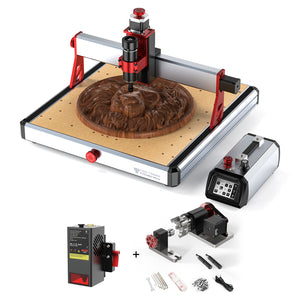
NewTwotrees TTC450 Ultra CNC Router Machine + TC20 Laser Module + 4th Axis
Regular price 27.066,00 KčRegular price30.816,00 Kč-3.750,00 Kč Sale price 27.066,00 Kč -
Save 7.014,00 Kč


Twotrees TTC-H40 CNC Router Machine + 20W Laser Module + 800W Spindle
Regular price 48.948,00 KčRegular price55.962,00 Kč-7.014,00 Kč Sale price 48.948,00 Kč -
Save 9.485,00 Kč


Twotrees TTC6050 CNC Router Machine + TC20 Laser Module + 4th Axis
Regular price 41.183,00 KčRegular price50.668,00 Kč-9.485,00 Kč Sale price 41.183,00 Kč


Know More
Choosing a CNC Router with a Laser Module
A CNC router with a laser module combines two different digital fabrication processes on a compatible motion platform. The spindle removes material with a cutting tool, while the laser module engraves or cuts compatible materials without physical tool contact. This collection is limited to current TwoTrees CNC product listings that explicitly offer a laser-inclusive bundle or configuration.
Browse the complete CNC router collection for standard machines. If you already own a compatible CNC and only need the upgrade component, use the laser module collection instead of purchasing another machine bundle.
1. Compare the Available CNC and Laser Platforms
| Machine platform | Working area | Laser-inclusive configuration | CNC configuration | Bundle choices |
|---|---|---|---|---|
| TTC450 Pro | 460 × 460 × 80 mm | TC20 laser module | 500W spindle in the current laser bundles | Selected packages add end mills, dust collection or a fourth-axis module. |
| TTC450 Ultra | 460 × 460 × 100 mm | TC20 laser module | Confirm the complete machine package on the product page | The current laser listing also includes a fourth-axis module. |
| TTC6050 | 600 × 500 × 100 mm | TC20 laser module | 500W spindle in the current TTC6050 configuration | The laser-inclusive package also includes a fourth-axis module. |
| TTC-H40 | Confirm the current product specification | A selectable configuration includes a 20W laser module | The laser-inclusive option lists an 800W router machine plus the standard spindle | Choose the exact laser-inclusive configuration; not every option on the listing includes the laser. |
Product titles, options and included components can change. Confirm that the selected configuration explicitly includes the laser module, spindle or router, power components and any additional accessories you require before ordering.
2. Choose the CNC Platform Before the Extras
Start with the machine size, working range, rigidity and spindle configuration needed for routing. A larger accessory package does not compensate for choosing the wrong base platform. The TTC450 Pro provides a 460 × 460 × 80 mm working area, the TTC450 Ultra provides 460 × 460 × 100 mm, and the TTC6050 provides 600 × 500 × 100 mm. Then decide whether end mills, dust collection or a rotary module are useful for your actual projects. Bundles with a fourth axis can also be compared in the 4 axis CNC router collection, where rotary capability is the primary selection factor.
3. Treat CNC Routing and Laser Processing as Separate Workflows
The spindle and laser module perform different jobs and require different setup, toolpaths and safety procedures. Remove or install components according to the machine instructions, select the correct operating mode and verify the work origin before each process. Do not assume that settings created for spindle machining can be reused for laser engraving.
4. Match the Laser to the Material and Project
A diode laser can engrave and cut selected non-metal materials when the material, thickness, focus, speed, power and number of passes are appropriate. Results vary, so test settings on scrap and follow the laser-module documentation. Do not process PVC, vinyl or an unknown material that may release hazardous fumes when heated.
5. Check Every Bundle Component
Similar product names may describe different packages. Verify the laser module, spindle or router motor, fourth axis, vacuum cleaner, cooling components and end mills listed for the exact product. A product image showing an accessory is not proof that the accessory is included. Select the correct regional plug and machine configuration before checkout.
6. Plan Software, Ventilation and Laser Safety
CNC routing normally requires a suitable CAD/CAM workflow and CNC toolpath, while laser work requires compatible laser-control software and laser-specific settings. Follow the documentation for the selected machine and module. Use certified laser eye protection matched to the wavelength, provide suitable ventilation, control fire risk, keep a suitable extinguisher nearby and never leave either process unattended.
Frequently Asked Questions
What is a CNC router with a laser module?
It is a compatible CNC motion platform supplied with both a spindle-based routing configuration and a laser-module configuration. The spindle removes material with a cutting tool, while the laser engraves or cuts compatible materials using a separate setup and toolpath.
How do CNC routing and laser engraving workflows differ?
CNC routing requires a cutter, spindle settings, machining feeds and an appropriate CNC toolpath. Laser work uses focus, laser power, speed, passes and laser-compatible software. Install the correct toolhead, select the proper machine mode and verify the origin and safety setup for each process.
Which TwoTrees CNC platforms have laser-inclusive bundles?
Current laser-inclusive product listings are available around the TTC450 Pro, TTC450 Ultra, TTC6050 and TTC-H40 platforms. Packages differ by spindle or router motor, fourth axis, vacuum cleaner, cooling components and end mills, so verify the exact configuration before ordering.
Should I use a honeycomb panel in laser mode, and what size do I need?
A honeycomb panel is recommended beneath the material during compatible laser cutting. It lets the beam pass into the honeycomb cells after cutting through, helping reduce reflected heat and scorching on the back of the material while providing space for debris and support for thin sheets. Choose a panel that fits on the machine bed and covers the area you normally process. The TTC450 Pro and TTC450 Ultra each have a 460 × 460 mm horizontal work area, while the TTC6050 has a 600 × 500 mm horizontal work area. The Z-axis heights—80 mm for TTC450 Pro and 100 mm for TTC450 Ultra and TTC6050—do not determine the honeycomb footprint. The panel should not be smaller than your usual laser work area or so large that it cannot fit securely on the machine bed.
Does every option on these product pages include a laser module?
Not necessarily. Some product listings contain several selectable configurations, and only a named laser-inclusive option contains the laser module. Read the option name and included-parts information rather than relying on the main product image.
What materials can the laser module process?
Compatibility depends on the laser module, material composition, thickness, focus and settings. Diode lasers can engrave or cut selected wood, paper, cardboard, leather and compatible dark acrylic under suitable conditions. Test scrap first, and never laser PVC, vinyl or unknown materials that may release hazardous fumes.
Do CNC and laser projects use the same software?
They may use different applications and toolpath settings. CNC work requires compatible CAD/CAM software and a suitable post-processor, while laser work needs software that supports the selected controller and laser mode. Confirm the current software guidance for the exact machine and module.
What safety precautions are required for the laser module?
Use certified eye protection matched to the laser wavelength, prevent exposure to the beam and reflections, provide suitable ventilation and control fire risk. Keep a suitable extinguisher nearby, follow the machine and module instructions, and never leave laser engraving or cutting unattended.


